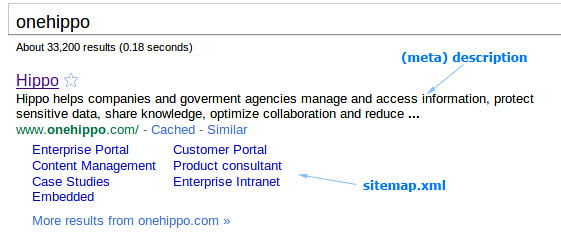
A lot of things are said about the use of metadata in a web environment. And rightfully so, metadata is important. That's why I want to do a couple of blog posts about this topic. This being the first: Which part of metadata is really important and which part isn't and how does it work in Hippo CMS?
Let's start with a definition of metadata:
Wikipedia: Metadata (metacontent) is defined as data providing information about one or more aspects of the data
Alright, so metadata is not really part of the content, but tells us something about the content. This page is in English, so we could have a property on this document which tell us it's in English, like so:
Now, the above isn't following any standard, I just made up my own. You can also make up your own schema's if you want. Go for it. However, don't be surprised when external applications will not recognize the data. In this case a web reader for blind people wouldn't know which language is used. That's why mankind defines standards. The standard way of showing English in HTML, is by starting your page like so:
And that's a lot smarter! So, now that we established the basics of metadata, let's dive into the most common metadata remarks I heard from clients at the start of a web project:
"Metadata is important for SEO, right?"
Yes, some metadata is important for search engines, other metadata is not. This is a blog I wrote about SEO earlier, but I'd like to dive a bit further into the metadata part this time. The BBC did extensive research on web guidelines, SEO and accessibility, which resulted in this advise on metadata for both editors and developers of their websites. A great starting point for your own set of rules! Here's an example that combines the above for your html pages and will probably satisfy 95% of your wishes:
Of course adding other terms in Hippo CMS is easy. If you want to do more, you could have a look at: Seo consultants on meta-tags and Dublin Core ( a standard for metadata ).
"Is there an important difference between content and metadata in a document type? And what do you expect us to define in order for developers to get started in Hippo?"
First of all, what is a document type anyway? A document type defines all fields [1] that can be present in an instance of the document type. Let's say you have a news document type with 4 defined fields: title, date, rich text editor and a metadata field copyright. That way in Hippo CMS you're sure editors only create just these fields and your news data is structured. Most consultants define all document types and fields first in an excel sheet. Probably you can do this yourself if you have one example. Based on this blueprint, document types can easily be created using the document type editor in Hippo CMS, like so:

And what's the difference between the copyright field (metadata) and the title field (content)? You can search, sort or filter on either of these. Both field types can be used to show in the page, an overview of news documents, html metadata, mobile website, webservice, RSS, multiple websites, etc. So it doesn't really matter from a technical standpoint which one you choose [2]. As a matter of fact the difference in above example is superficial, I just added "metadata:" in the label of the copyright field. Another visual way of doing it, is making it a different color or have all the metadata on the right hand side of the document as is done in a screenshot below.
So if it's technically unimportant, why did I add it then? Because the difference is important for an editor. It should be logical and understandable why you're entering the field. If the field is just there without something indicating that it's metadata, an editor could think the field is not being used and just leave it out [3][4]. Worse, editors can have different thoughts about what to fill in and you're ending up with a lot of inconsistent content and a waste of time and effort. Choose whichever guideline is logical to your use case. For example: when a field is visible in the design of a detail page, then it's a content field. When a field is used as a filter in faceted search or otherwise it's metadata.

Just a metadata field called "tags" or "categories" as is done in above screenshot is asking for useless content as well. Describe for an editor why you're being asked to fill in the field. More on tags and categories in a later blog.
Which metadata do I get by default in Hippo CMS?
The system adds the following fields automatically and you won't be able to edit them in the document:
- createdBy editor X, Y or Z.
- creationDate
- lastModificationDate
- lastModifiedBy
- publicationDate
- language (since Hippo CMS 7.5)
The above fields are used for internal reports, searching in Hippo CMS, etc. Also these dates are used by the workflow to (un)publish a document on a certain time. Technically it's possible to show these fields in your website or sort on them. However, it is usually better to add them to your document type, so you have full control over it [5].
That's it for part 1. Hope this blog is useful to you. I'll post part 2 soon.
[1]: Including type of field, which I didn't mention for simplicity's sake. You can see some of the options in the screenshot like Boolean, String, Date, etc. Field type options also include rich text editor, internal link and many more.
[2]: The exception would be for linked/inherited document types in faceted navigation/search. Then, in order to perform well, a field needs to be on a property of the document node itself if you want to sort on it, do range queries or use it for the faceted browsing. See documentation on the Hippo CMS developer wiki for more information.
[3]: Of course you can make the field required, but that usually doesn't help. Editors will just add nonsense and you'll be worse off.
[4]: In larger organizations we often see a dedicated team responsible for just editing metadata. This can be very useful, but make sure you're not unnecessarily slowing down the process.
[5]: The exception would be the fields that are used just for the HTML metadata, like DCTERMS.created and DCTERMS.modified. You can best use the systems properties for this, because it will be a step less for editors.