Sunday, June 5, 2011

On metadata in your web environment - part 1

A lot of things are said about the use of metadata in a web environment. And rightfully so, metadata is important. That's why I want to do a couple of blog posts about this topic. This being the first: Which part of metadata is really important and which part isn't and how does it work in Hippo CMS?

Let's start with a definition of metadata:

Wikipedia: Metadata (metacontent) is defined as data providing information about one or more aspects of the data

Alright, so metadata is not really part of the content, but tells us something about the content. This page is in English, so we could have a property on this document which tell us it's in English, like so:

Now, the above isn't following any standard, I just made up my own. You can also make up your own schema's if you want. Go for it. However, don't be surprised when external applications will not recognize the data. In this case a web reader for blind people wouldn't know which language is used. That's why mankind defines standards. The standard way of showing English in HTML, is by starting your page like so:

And that's a lot smarter! So, now that we established the basics of metadata, let's dive into the most common metadata remarks I heard from clients at the start of a web project:

"Metadata is important for SEO, right?"

Yes, some metadata is important for search engines, other metadata is not. This is a blog I wrote about SEO earlier, but I'd like to dive a bit further into the metadata part this time. The BBC did extensive research on web guidelines, SEO and accessibility, which resulted in this advise on metadata for both editors and developers of their websites. A great starting point for your own set of rules! Here's an example that combines the above for your html pages and will probably satisfy 95% of your wishes:

Of course adding other terms in Hippo CMS is easy. If you want to do more, you could have a look at: Seo consultants on meta-tags and Dublin Core ( a standard for metadata ).

"Is there an important difference between content and metadata in a document type? And what do you expect us to define in order for developers to get started in Hippo?"

First of all, what is a document type anyway? A document type defines all fields [1] that can be present in an instance of the document type. Let's say you have a news document type with 4 defined fields: title, date, rich text editor and a metadata field copyright. That way in Hippo CMS you're sure editors only create just these fields and your news data is structured. Most consultants define all document types and fields first in an excel sheet. Probably you can do this yourself if you have one example. Based on this blueprint, document types can easily be created using the document type editor in Hippo CMS, like so:

And what's the difference between the copyright field (metadata) and the title field (content)? You can search, sort or filter on either of these. Both field types can be used to show in the page, an overview of news documents, html metadata, mobile website, webservice, RSS, multiple websites, etc. So it doesn't really matter from a technical standpoint which one you choose [2]. As a matter of fact the difference in above example is superficial, I just added "metadata:" in the label of the copyright field. Another visual way of doing it, is making it a different color or have all the metadata on the right hand side of the document as is done in a screenshot below.

So if it's technically unimportant, why did I add it then? Because the difference is important for an editor. It should be logical and understandable why you're entering the field. If the field is just there without something indicating that it's metadata, an editor could think the field is not being used and just leave it out [3][4]. Worse, editors can have different thoughts about what to fill in and you're ending up with a lot of inconsistent content and a waste of time and effort. Choose whichever guideline is logical to your use case. For example: when a field is visible in the design of a detail page, then it's a content field. When a field is used as a filter in faceted search or otherwise it's metadata.

Just a metadata field called "tags" or "categories" as is done in above screenshot is asking for useless content as well. Describe for an editor why you're being asked to fill in the field. More on tags and categories in a later blog.

Which metadata do I get by default in Hippo CMS?

The system adds the following fields automatically and you won't be able to edit them in the document:

  • createdBy editor X, Y or Z.
  • creationDate
  • lastModificationDate
  • lastModifiedBy
  • publicationDate
  • language (since Hippo CMS 7.5)

The above fields are used for internal reports, searching in Hippo CMS, etc. Also these dates are used by the workflow to (un)publish a document on a certain time. Technically it's possible to show these fields in your website or sort on them. However, it is usually better to add them to your document type, so you have full control over it [5].

That's it for part 1. Hope this blog is useful to you. I'll post part 2 soon.

[1]: Including type of field, which I didn't mention for simplicity's sake. You can see some of the options in the screenshot like Boolean, String, Date, etc. Field type options also include rich text editor, internal link and many more.

[2]: The exception would be for linked/inherited document types in faceted navigation/search. Then, in order to perform well, a field needs to be on a property of the document node itself if you want to sort on it, do range queries or use it for the faceted browsing. See documentation on the Hippo CMS developer wiki for more information.

[3]: Of course you can make the field required, but that usually doesn't help. Editors will just add nonsense and you'll be worse off.

[4]: In larger organizations we often see a dedicated team responsible for just editing metadata. This can be very useful, but make sure you're not unnecessarily slowing down the process.

[5]: The exception would be the fields that are used just for the HTML metadata, like DCTERMS.created and DCTERMS.modified. You can best use the systems properties for this, because it will be a step less for editors.

Tuesday, March 22, 2011

Top 10 reasons for open source success - Is the Hippo up to the task?

In real life, a Hippo is a fairly quick animal. It can run up to 25 mph (40 km/h). I even heard rumors of people saying the animal passed at a striking 30mph! That's an amazing pace. Even more so if you realize they weigh around 4,000 lb (1.800 kg). Unbelievable.

A blogging Hippo however isn't always that fast. Almost two months ago thechangelog posted a blog summing up the top 10 reasons why an open source project is not used. A couple of days later, Stefane Fermigier of Nuxeo ECM posted a reply asking "How does Nuxeo stack up?". As for the Hippo, well... unlike the real animal. This Hippo runs a little late. You're lucky you didn't really wait for him. Crossing the finish line 50 days behind to finally form a response. Weighing each word carefully with his 4,000 lb of body weight. So today is the day that the Hippo finally hopes to cross the finish line.

It seems like Nuxeo did stack up to all the questions and maybe therefor is used and supported by an engaged community of developers. Is Hippo up to the same task? You'll soon find out. But before we start. Why don't we give our little guy a cheer? Hurray. Hippo. Hurray.

The ten questions:

1. You don’t have a friggin’ Readme
All info can be found at our project's website. It includes installation instructions, links to register on mailingslists, our bugtracking system, which developers contribute to the source code and it describes which other open source projects have been used. Hippo likes to repay the open source communities by participating in these projects. Either by contributing code or helping other developers on mailinglists. Since our external source code mostly relies on projects from the Apache software foundation, Hippo likes to sponsor and participate at their conferences.

2. You don’t include tests, specs, features, examples
We use Hudson and Sonar to continuously monitor the projects.

The features and possibilities are best described at our company website: www.onehippo.com. Each plugin for Hippo CMS usually contains an example and documentation. A showcase demo website can be found here . It features a website for a non-existing sustainable company called Hippo Go Green. We tried to make a showcase project combining widely used plugins while keeping the demo simple enough for people to understand. If you're missing features or have any other suggestions, I would surely appreciate your feedback. You can mail me directly (mdotbrandatonehippodotcom) or add a comment on this blog.

3. You have no project home page
http://www.onehippo.org.

4. You need design help
For new features we often make a couple of prototypes and organize usability testing during the whole process. This generally results in a user interface that is both very user friendly and cool :)

If you want to keep track of the latest and greatest interaction designs or even participate now and then to make the product better? Great! You can start by reading Rolf van der Steen's blog and participate in his experiments.

5. You don’t have a domain name
onehippo.com and onehippo.org

6. You don’t have a Twitter Account
We have one account for all Hippo related twittering: http://twitter.com/#!/OneHippo. Our blogs, like this one, can be found on planet.onehippo.org/.

7. Your licensing is unclear
That's an insult ;) We have a license.txt in the svn code repository of each project. A general description can be found on our www.onehippo.org.

So how do we make money? Check out "what we sell" on www.onehippo.com.

8. You don’t reach out to me
We often organize webinars; always announced on our company website and free to join. Of course we twitter about them as well. We have a user group on linkedin. Video's can be found here including one that will help you start developing in no time. The best responses for (technical) questions by developers can be found on our mailing lists / forum. You'll generally receive great responses if you're new or found a difficult problem to solve. If you want us to invest more time to help you succeed? We offer guaranteed response times and a personal touch through our support subscriptions. We have one that fits in any situation.

9. You don’t speak about your project at conferences and meetups
Sure we do. Why don't you join our get togethers? We regularly organize them and we're announcing one again soon. Just sign up ;) Next week we're at the Gartner summit in LA. Feel free to visit us at our stand.

If you're interested in having a meetup near you? Ping us on twitter!

10. You didn’t submit it to The Changelog
Your slogan reads: "Open source moves fast, keep up". Okay, from a blogging perspective we're clearly not up to that task yet. But I'm pinging you right about now.

Hurray!

Tuesday, March 15, 2011

Hippo in Boston

It's been just over a week now, since Hippo opened up the Boston office. Colleagues, implementation partners, clients and friends have been asking me what the place looks like. Here's a first impression. Hope you like it as much as I do.

The Hippo Boston office is located next to the Kendall / MIT subway stop (red line). You can be in Boston Central or at the airport in a matter of minutes. And of course, you can also park your car.

The surrounding high tech companies and innovative MIT startups create a great working atmosphere. It's nice and quiet most of the time. Mostly because there are phone booths when you need to make a call; a feature that has been requested for years on end by my Dutch colleagues. Well guys, you can finally work peacefully.

Now turn on your sound system and play the video below...

That's right, you hardly hear anything. Nice, huh ;)

Meeting rooms

An example of something I specifically like about the building. We share meeting rooms on a first come, first serve basis. The system to reserve the room is so nice, you'd almost reserve the room, just because it's so neat to reserve the room. Watch the video:

A great city

Boston is great. Universities always give a city a nice touch. And saying Boston has a couple of them would be a big understatement. I specifically like the initiatives to encourage biking around the city. It matches well with the Hippo credo to provide each employee a bicycle. Not surprisingly. It's nice to bike to work. Not just because it's healthy, mostly because it's fast.

By the way. The bike in the picture is a Hippo bike and that little orange dot riding the bike is a Hippo :) This Thursday I'll probably see a lot more of the city as Saint Patrick's Day is coming up. I'm supposed to be getting ready for it. Okay. I think I am ready.

So, why an office in Boston?

Hippo came to Boston to better serve the growing number of East Coast clients and partners. We've seen an astonishing amount of interest coming our way as Hippo CMS is clearly capable of serving the largest web properties in the world and more and more Americans start to experience our products. Yes, word of mouth is still a powerful marketing tool. Furthermore, most medium to large companies realize open source isn't just a viable alternative to closed source, it's becoming mainstream.

A second big reason to come to Boston is the time difference with Amsterdam compared to Amsterdam / San Francisco. We can just work better together to integrate our development efforts.

Looking for an interesting job?

As a last note... if you're interested in working for us as a developer in our brand new Boston office? Feel free to get in touch. We are hiring...

Wednesday, November 10, 2010

Not open minded after all

I must confess. I'm not open minded after all...

My MP3 player was lost and I needed music. So last weekend I went to buy a simple MP3 player. I like gadgets the Spartan way. Not too many buttons to press, not too many things that go wrong. I thought I found just the right one. A Philips MP3 player.

There were 2 versions of it. A 30 Euro version with 2 gigabytes of storage and a 40 Euro version with 4 gigabytes of storage. I like cheap, so I opted for the 30 Euro one.

"Let me get that for you", the guy said. "Hmm... sorry sir, I only have the cheap one in pink", he continued.

So you can guess which one I bought. Yep, the 40 Euro one in grey. The smart sales guy is taking advantage of my short minded mind. Just offer the cheap one in pink and a sensible one for a bit more and most guys will end up spending a bit more. It made me wonder. If Hippo wouldn't be fully open source, we could pull the same trick on people.

Hippo in Pink Logo

"So sir, you don't like that pink Hippo logo with the hat in your CMS? Well, we can set you up with a nice blue logo. Very representable. Would you like to pay cash or credit card?"

Thursday, August 12, 2010

The little secret about Search Engine Optimization

Your average Hippo customer isn't stupid. She's smart. Let's call her Paula. I like that name. Paula. Now let's say Paula is a web analyst and works for a large non profit organization. And because she's smart, she's migrating to Hippo CMS 7. Before she did this, she read some extensive reports on SEO. Her company even hired an SEO consultant to verify her website. But she also noticed a lot of Hippo websites got the highest rankings.

She asked me why. Did I know a little secret perhaps? My answer is yes. I do have a little secret for Paula...

But first I will tell you exactly what Paula knows. So here it goes.

Paula knows

Human Readable URL's are important. Luckily she got it out of the box in Hippo CMS.

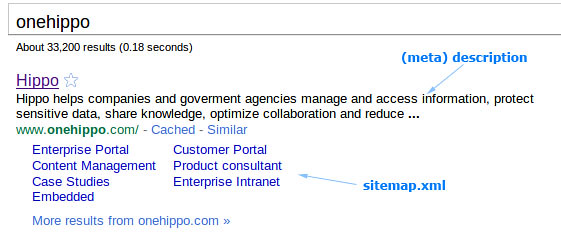
Paula knows where the description text in her Google search results comes from. See picture below. Better yet, she knows how she can easily manipulate it in her own Hippo CMS.

A friend of Paula told her about a thing called a sitemap. Although search engines won't promise you they will use it, it is pretty nice if they do: giving visitors an overview of your website in search results. See picture below. The Hippo forge has a nice sitemap plugin using the sitemap standard. The installation is easy. That's why Paula has it now. search results in google with sitemap feature

Keywords

Things started to get a bit messier with a discussion about keywords. Paula knows it can be a lot of work to add well chosen meta keywords to your pages. She used to give the editors guidelines to try and match all the important search queries in Google; adding keywords for higher search rankings. The editors had entered them extensively in their old CMS and I didn't want to migrate them, for they weren't very helpful at all. Even worse, they were always the same.

Why don't you migrate them? She asked. Google likes them, I read it in my report by the SEO consultants.

So I explained her what a nice job it must be, being an SEO consultant. It seems you can basically write whatever you want. Why? The search ranking algorithm isn't public. So a bit of the mystery remains. I'm not saying meta keywords will hurt your search results. But they won't help you either.
Don't believe me? Check this guy's video:
Google does not use the keywords meta tag in web ranking.

So don't spend your time on keyword optimization for external search engines. Rather spend it on keywords for use within your own website. For example in your own search engine. Try making sure the list of keywords in your article is short and relevant. Then people will find what they are looking for faster and you can influence your website's search results. But searching within your own website is a different topic altogether. I might write about that another time.

Link farms

Very important is the amount of linking between you and other websites. If you link to a normal relevant website and they link back, it's pretty good news for your search results. However a link farming doesn't work. That is bad news for your ranking. Broken links on your website don't help you either, so luckily Hippo CMS has a lot of tooling for that.

Performance matters

Paula didn't know performance mattered for search engines. It does. Check this page by Google about it.

I'm glad speed matters. I like fast websites. And others do too! It will get give your visitors a better feeling of usability. Higher performance leads to more page views. People return more often to fast website. Some people argue it's the most important feature of your website. Anyhow. I'm glad Hippo can provide you with lightning speed.

Nice, nice, nice, but now I want the secret

So you're wondering why Hippo websites rank as high as they do? What is the secret? Is it about all the rules applied above? Partly.

The real secret is your content. There's no smart technical feature giving you high rankings without having relevant content people like. So the amount of pages with nice relevant articles is the little secret I'll give away. And that's exactly what editors in Hippo CMS can focus on. A search term in the title or introduction is more important then a search term in the body. But you don't have to tell people that. They do that already.

And by the way. Paula is very happy and is getting high search results. Are you next?

All characters and events in this blog — even those based on real people — are entirely fictional.

Monday, May 17, 2010

There's a Hippo on my Ipad

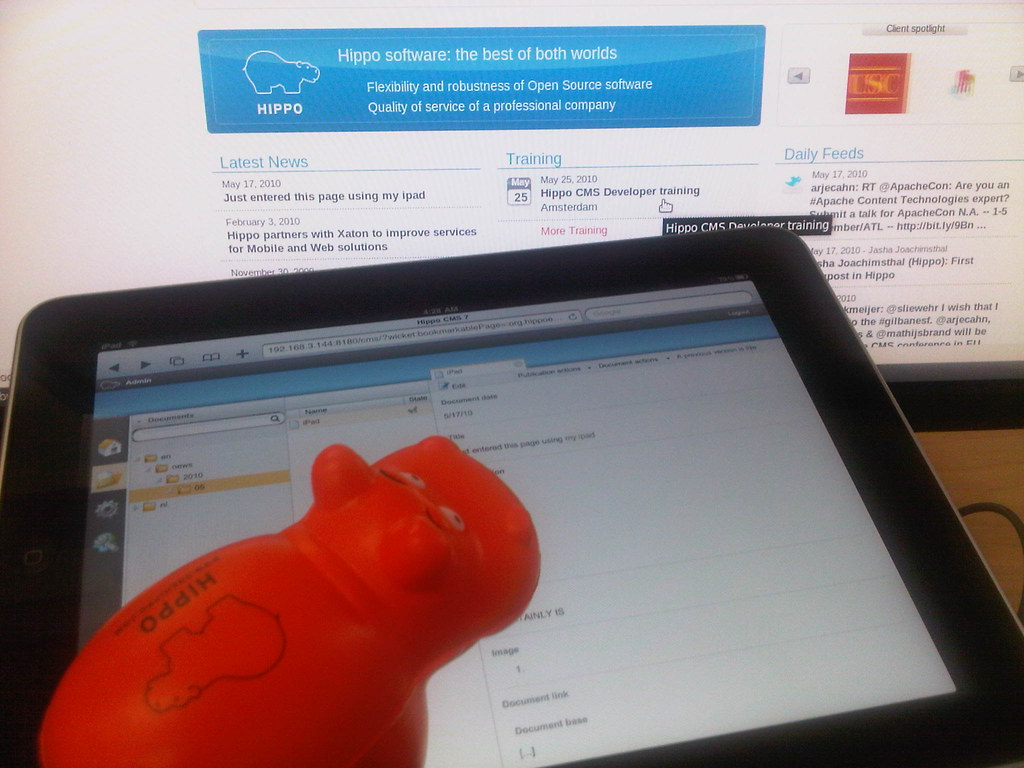
Okay, okay, so it won't be your favorite editing tool, but the Ipad surely looks a lot cooler with a Hippo on it! Hippo CMS on the Ipad

Friday, May 7, 2010

Smoothly going through a Hippo CMS project

Jboye 2010 has come to an end. The Jboye conference is about getting CMS expert users, analysts and vendors together. The central idea is to learn more by communicating openly. This means I shouldn't too obviously put marketing messages in my sentences, so you can have interesting discussions and get to the point. I like this idea since it's very close to communicating in an open source project. A project like Hippo CMS for example, the best and most user friendly CMS in the world, especially if you have huge amounts of content. Java developers love it. By the way, here's one of those cute Hippo toys.


My first day at the conference I selected a tutorial course about rapid prototyping by James Hobart. Prototyping helps in getting expectations aligned quickly. It's not all that easy to turn the ship around once it's close to the harbour, so it makes sense to make a prototype early in the project. It's an investment, but a very important one.


That's why prototyping combined with SCRUM became a common practice at Hippo. I don't want to keep all the success to myself, so I'm sharing a couple of best practices for a Hippo CMS project in this blogpost. If anything is too technical, please say so. If you think you do it better, please share. If you don't know SCRUM, this is a very fast video introducing you to it under 10 minutes. A sprint takes about two weeks depending on the size of the project and your personal preferences. In small projects a sprint and a phase is the same thing. In larger projects a phase takes one or more sprints.


The business case

The most important part of a project is not part of the project. It's about getting your business case straight. A question you should ask yourself: why are we actually doing this? Which audience do we target and what value does it have for our business. In other words: describe your targets. Once this is clear, don't forget to share your carefully designed ideas. I share the business goals and targets with everyone participating in the project. Even when it's unessential for someone's day-to-day job. In the end this understanding delivered better and more consistent projects. At Jboye I had the pleasure to meet Christine Pierpoint. She had inspiring ideas you should take into account before starting a web project and in this video some of these interesting thoughts will come to you.


The design phase

The (user action) designers can take on the business case and start designing: screen-shots, scratches, wire-frames, anything concrete. Details are not important yet. Keep your focus on the absolute minimum the project needs to go live with. The reason I always focus on the bare minimum is because a) it's nice to get fast results, b) search engines can start indexing your website, c) your marketing people can get going, d) it's easier to end up with something, surprisingly this is not straightforward . A Hippo project has a very solid foundation, so don't worry about adding modules and features after going live. That is, if you make sure you have some Hippo certified developers on your team.


A clickable website

The goal of this phase is to get a real website with HTML, javascript and CSS up and running. No connections to any database or repository. Just plain text, easy programming. I don't like latin texts in a design, because people don't seem to understand what these "lorem ipsum" texts are about. It's confusing, so better use good examples or even texts describing the sort of content that should be there. A functional design can be helpfull for details, but nothing beats having a go at something similar to the end product. I make every link clickable, to make sure the interaction is clear. The clickable website will give you valuable feedback fast. Developers, designers, managers, editors and end users can all have conflicting ideas. Discussions in this phase are necessary. Don't avoid them, but end up with conclusions everybody agrees upon. Your clickable website will help you focus.

About the tools used for a clickable website:
Hippo developed guidelines to make the web design extensible and accessible, however Hippo CMS doesn't impose any technical restrictions on your web design. You're really free to do whatever you're used to do. My team usually creates a simple maven project, use svn for versioning, jsp for coding and jetty to run it all. We created a lot of code snippets for paging, calendars, faceted navigation, related items, forms, header and footer templates, etc. Hippo has support for any javascript library you would like to use, although we tend to use jquery. Don't use more than one javascript library. It ruins your performance. Because projects requirements tend to change all the time during this phase your precious code turns into spaghetti quite easily. That's why we usually keep the clickable website as a seperate project. You can take a different approach and use your own tools or use Hippo Site Toolkit from the start.


The content model and architecture

While frontend developers, end users and business people are getting together to focus on the look and feel of the website, extranet or intranet. The analysts can work on the content model and architecture. You can start at the same time the clickable phase starts and of course there's some overlap. Take your time during this phase to get a good overview of the content model. It's essential for any CMS project. I like to use an excel sheet to describe all the templates, but anything will do as long as it's clear. A news page for example can have a title, a date used for sorting, an introduction, a rich text field, a multiple thumbnail picture or whatever you would like it to have. Don't forget to describe metadata. A simple website has a couple of templates, for example a news template, a simple text template, a template for adds and so on. Define them. Hippo CMS is content driven, so you're defining content types, not web pages.

Next to the model, it's smart to define a good way to structure the actual content in folders, so make a basic setup with a folder for news items or a folder for the communication department depending on your preferences. Editors have an opinion about this, so ask them. The way you structure your content doesn't have to be the same way you structure your website. In Hippo Site Toolkit you can query the content anyway you like. Questions to help you get your answers: Where does each type of content come from. Does the content come from an external source like a webservice or rss feed? Which groups of editors add which content, for example do you have a group of people only editing news pages? If that's the case you help editors a lot by only showing the news pages in Hippo CMS. It's more user friendly and secure.


Hippo CMS and data entry

Because of the Hippo CMS architecture, you can first get Hippo CMS up and running and later further develop your website. This means content migration can take place first and editors can start entering content before the project is finished. That is, as long as you have your (test / acceptance) servers up and running. Even though Hippo CMS is very user friendly, a training course and custom documentation for editors can help to get going fast and consistent. The training material can also be used for writing guidelines. Do you have to migrate a lot of content and you're stuck with tons of xml files? This tool comes in handy. Changes in your content model are more expensive from this phase onwards, but not impossible. If you need to make a change, do it, but only if you're sure you really need it. More info for developers on: http://www.onehippo.org/.


Adding features and phases recursively

Your project is growing and growing and soon your real website starts to look better then your clickable website. You can add sprints until the end of your project's lifecycle, so don't put too much pressure on the first time you enter the world wide web.


Champagne

I congratulate you for reading this and hope you share a glass of champagne with me once your own Hippo CMS project goes live, so feel free to contact me even if it doesn't go as planned. We wouldn't leave you out in the cold. For guarantees and a healthy relationship Hippo offers support. Hippo taking care